Every freelancer knows this scenario: A potential client reaches out, interested in working with you. You reply asking about their availability. They respond two days later with times that no longer work. You counter with new options. They're now talking to three other freelancers.
You lost the project - not because of your skills or pricing, but because booking a call took too long.
Speed Wins in Freelancing
When a potential client decides they need help, they want to move fast. They're motivated now. Tomorrow, they might be distracted by something else.
The freelancer who gets on a call first has a massive advantage:
- You shape the conversation before competitors enter it
- You build rapport while you're top of mind
- You understand their needs before others even respond
Every hour of scheduling friction gives competitors time to catch up.
The True Cost of Email Tag
Let's trace a typical freelance inquiry:
Day 1: Client emails asking about availability Day 1: You reply asking when works for them Day 2: They suggest Tuesday at 2 PM Day 2: You can't do Tuesday - you counter with Thursday Day 3: Thursday doesn't work for them - how about Friday? Day 4: Friday at 3 PM is confirmed Day 5: You finally have the call
That's 4 days of back-and-forth for a single meeting. During those 4 days:
- The client's motivation faded
- They contacted other freelancers
- Their problem might have evolved
- They forgot why they reached out
Now compare to instant booking:
Day 1: Client clicks your booking link, sees your availability, books tomorrow at 10 AM Day 2: You have the call
Same outcome, but you got there while they're still excited about solving their problem.
What Clients Actually Want
When a potential client looks for a freelancer, they want:
- To quickly assess if you're credible - Portfolio, experience, professionalism
- To easily book time with you - No friction, no waiting
- To feel confident they're making a good choice - Trust signals matter
Most freelancers optimize for #1 (portfolio) but ignore #2 and #3. A polished portfolio means nothing if booking a call feels like work.
Stop losing clients to scheduling friction. bookcall lets prospects book instantly while seeing your profile and work.
Try it freeSetting Up Instant Booking
A booking page lets clients schedule time with you immediately. Here's what matters:
Always-On Availability
Your booking page works 24/7. A client in a different timezone browsing at midnight can book - no waiting for you to wake up and reply.
Real-Time Calendar Sync
Connect all your calendars. When someone books, it appears on your calendar instantly. When you block time for a project, it's immediately unavailable for booking.
No double-bookings. No "sorry, I actually have a conflict."
Automatic Timezone Handling
Clients see your availability in their local timezone. A client in London booking with you in Los Angeles sees times that make sense for them - no mental math, no confusion.
Zero Friction
The ideal booking flow:
- Click your link
- See available times
- Pick one
- Enter name and email
- Done
That's it. No account creation, no long forms, no dropdown menus for timezone selection.
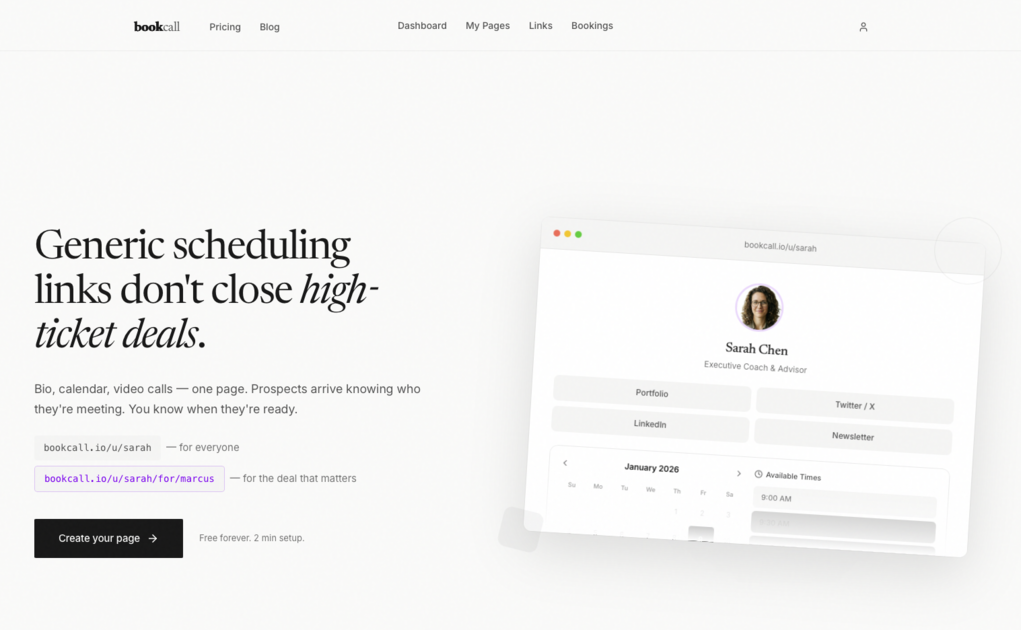
Your Booking Page as a First Impression
For freelancers, the booking page is often your first real interaction with a client. It should reinforce your professionalism:
Show Your Face and Name
Clients want to know who they're hiring. A photo and name immediately make the interaction personal. They're not booking a call with "XYZ Creative Agency" - they're booking with you.
Include a Brief Bio
One or two sentences covering:
- What you do
- Who you work with
- Why you're good at it
Example:
"I design brand identities for early-stage startups. After 8 years and 100+ projects, I've developed a fast, collaborative process that gets results without endless revisions."
Link to Your Work
Your booking page should include links to:
- Portfolio
- Website
- Relevant case studies
These aren't for every visitor to click. They're reassurance signals: "This person is real and has done good work."
Where to Put Your Booking Link
The faster clients find your booking link, the faster they book. Put it everywhere:
Email Signature
Every email you send should include a booking link:
—
Alex Chen
Freelance Brand Designer
Book a call: bookcall.io/u/alexchen
When someone emails asking to "hop on a call," you can reply: "Sure! Here's my link: [booking link]"
Portfolio and Website
Your contact page shouldn't be a form that goes into a black hole. Include your booking link prominently:
- "Interested in working together? [Book a 30-minute call]"
- In your site header/navigation
- At the end of case studies
Social Profiles
LinkedIn, Twitter, Instagram - wherever potential clients find you:
- LinkedIn: Add booking link to your featured section and about section
- Twitter/X: In your bio
- Instagram: In your link-in-bio
Proposals and Follow-ups
When you send a proposal, include your booking link:
"If you'd like to discuss this further, grab time on my calendar: [link]"
After sending work for review:
"Let me know if you have questions, or book a quick call if you'd rather discuss: [link]"
Handling the "What's Your Availability?" Email
When someone emails asking about your availability, don't reply with times. Reply with your booking link:
"Happy to chat! Here's my calendar - pick whatever time works best for you: [link]"
This:
- Eliminates back-and-forth
- Shows you're professional and efficient
- Lets them book while they're thinking about it
Preparing for Client Calls
Booking the call is step one. Making it count is step two.
Confirmation Emails
When someone books, they should immediately receive:
- Confirmation with date, time, and timezone
- Video call link
- Brief note on what to expect
- Easy reschedule option
Quick Client Research
Between booking and the call, spend 10 minutes learning about the client:
- Check their website
- Look at their current brand/product
- Note any obvious challenges or opportunities
Coming to the call prepared shows professionalism and builds trust.
Reminder Strategy
24 hours before, an automated reminder keeps the call top of mind:
- Friendly reminder (not corporate)
- Meeting link again
- "Looking forward to learning about your project"
This reduces no-shows significantly.
Protecting Your Time
Instant booking shouldn't mean constant interruptions. Structure your availability:
Batch Your Calls
Instead of scattered meetings throughout each day:
Monday:    Deep work (no calls)
Tuesday:   Calls: 9 AM - 12 PM
Wednesday: Deep work (no calls)
Thursday:  Calls: 2 PM - 5 PM
Friday:    Calls: 10 AM - 12 PM
This gives you blocks of uninterrupted time while still offering plenty of availability.
Add Buffer Time
15-30 minutes between calls prevents:
- Running late to the next call
- Feeling rushed
- No time to take notes from the previous call
Limit How Far Ahead They Can Book
2-3 weeks of availability is usually plenty. Showing 6 months ahead creates confusion and means you might forget about meetings booked months ago.
Rescheduling Without Email Tag
Clients sometimes need to reschedule. This shouldn't require email back-and-forth.
Every confirmation email should include a reschedule link. One click, pick a new time, done.
This saves you time and keeps clients happy - they don't have to write an apologetic email and wait for you to respond.
Video Call Integration
Most freelance discovery calls happen over video. Your booking system should handle this automatically:
- When someone books, a video call link is generated
- Link included in confirmation and reminder emails
- One click to join, no account required
This eliminates "which Zoom link?" confusion and looks more professional than sending a link manually.
Common Freelancer Scheduling Mistakes
Hiding Your Availability
Some freelancers resist sharing availability because they don't want to seem "too available." This is backwards - easy booking signals professionalism, not desperation.
Too Many Meeting Types
Do you really need separate booking types for:
- 15-minute quick chat
- 30-minute intro call
- 45-minute project discussion
- 60-minute deep dive
For most freelancers, two options are enough:
- 30-minute call (default for most conversations)
- 60-minute call (for complex projects or existing clients)
Manual Calendar Entry
If you're manually adding meetings to your calendar after someone emails you a time, you're wasting time and risking double-bookings. Automate it.
Separate Tools for Everything
Many freelancers use:
- Linktree for bio/links
- Calendly for booking
- Zoom for calls
That's three tools, three subscriptions, three places to manage. A single tool that combines your profile, booking, and video is simpler and more professional.
Book Faster. Win More Projects.
bookcall gives you instant booking that clients actually enjoy using. Your professional profile and scheduling in one place - share one link instead of three. Automatic calendar sync, built-in video calls, no Zoom subscription needed.
- ✓ No credit card required
- ✓ Calendar sync included
- ✓ Built-in video calls